
How I Built a Cognitive Work Architecture Using Tools Most Enterprises Already Own
By Alex Cuciurean | August 2026
The Problem No One Talks About
If you lead infrastructure or cloud at a global enterprise, your day doesn’t start with strategy. It starts with triage.
Twelve Teams threads. Three SharePoint trackers. A hundred emails. SAP S/4HANA RISE decisions waiting for input. Azure migrations running across 47 locations. Vendor SOWs that need commercial analysis before someone signs something they shouldn’t.
The information exists. It’s scattered across inboxes, chat threads, documents, and people’s heads. The job of a senior technology leader has quietly become: synthesize everything, constantly, and make the right call before the window closes.
Single-chatbot setups don’t solve this. Asking one AI assistant to handle commercial analysis, FinOps governance, project reporting, and executive communication is like asking one person to be your CFO, CTO, PMO, and Chief of Staff simultaneously. The context window bleeds. The outputs get generic. You end up re-prompting and re-checking until you’ve spent more time managing the AI than it saved you.
I decided to try something different.
The Idea: What If AI Agents Worked Like a Team?
In any well-run organization, you don’t ask one person to do everything. You hire specialists, give them clear mandates, and let them collaborate. The executive’s job is to set direction and make decisions, not to do the analysis themselves.
I applied the same principle to AI.
Instead of one chatbot that tries to be everything, I built four specialized agents, each with a distinct domain, distinct instructions, and distinct analytical frameworks. They collaborate autonomously. They delegate work to each other. They maintain persistent memory across sessions. And they report back through a single interface.
I call it the Cognitive Work Architecture (CWA): an AI technology operating model where specialized agents function as a virtual workforce.
The kicker: it runs entirely on Microsoft 365 tools most enterprises already have licensed. No custom code. No Azure OpenAI deployment. No third-party SaaS. Just Copilot Studio, Power Automate, and Dataverse.
Incremental software cost: $0. (Well, almost. More on that later.)
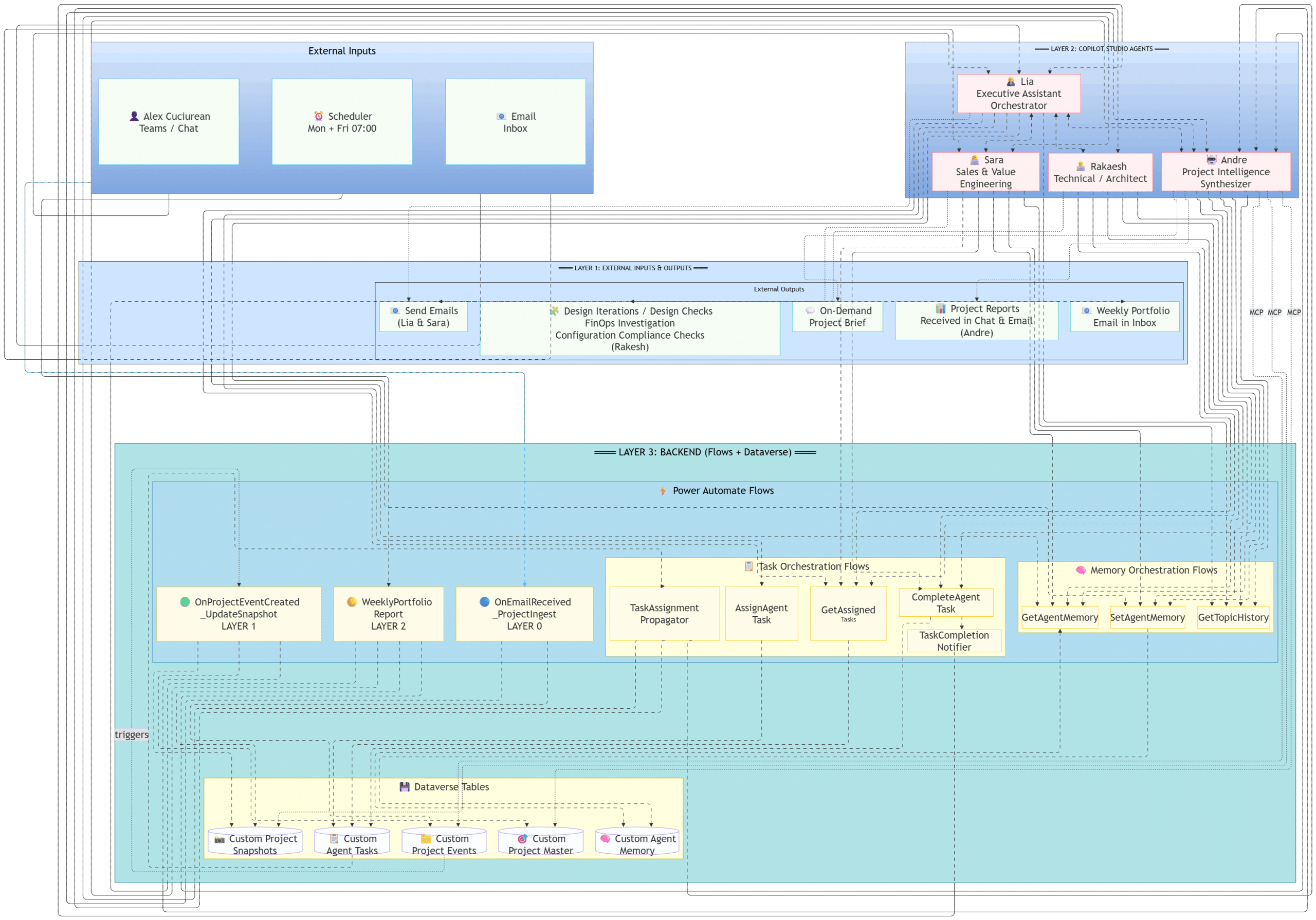
The Architecture: Three Layers, Four Agents
The CWA is organized into three layers. Understanding the layers is the key to understanding why this works at enterprise scale and why it’s different from a chatbot.
Layer 1: External Inputs & Outputs
Everything starts with three input channels:
- Me: via Teams chat. I talk to one agent only.
- A scheduler: automated triggers that run Monday through Friday at 07:00.
- Email: project emails flowing into the inbox, ingested automatically.
Outputs flow back through the same channels: emails drafted and sent, project reports delivered to chat and inbox, FinOps analyses completed, design reviews documented. The system produces work products, not just answers.
Layer 2: The Copilot Studio Agents
This is the brain. Four agents, each built in Copilot Studio with deep system instructions, domain-specific frameworks, and access to the tools they need through Work IQ MCP connectors (Mail, Teams, SharePoint, OneDrive, Calendar).
🟣 Lia — Executive Assistant & Orchestrator My sole interface. Lia manages communications, orchestrates the other three agents, and synthesizes their outputs into executive-ready briefs. When I ask a question, Lia decides whether she can answer directly or whether it needs to be delegated. She assigns tasks, tracks completion, and reports back. Think of her as a Chief of Staff who never forgets a thread.
🔴 Sara — Sales & Value Engineering Sara handles commercial analysis. She translates technical capability into business outcomes using MEDDPICC qualification and PISB (Problem, Impact, Solution, Benefit) frameworks. When a vendor sends a proposal, Sara breaks down the cost structure, identifies risks, builds 3-option comparison stacks, and drafts the response. She doesn’t send anything, she drafts, I approve.
🔵 Rakaesh — Technical Architect & FinOps Rakaesh is the technical and financial governance layer. He runs FinOps audits, evaluates infrastructure designs, checks configuration compliance, and flags cost anomalies. When a migration SOW comes in, Rakaesh analyzes the technical scope, identifies gaps, and quantifies the financial exposure.
🟢 Andre — Project Intelligence Synthesizer Andre is the PMO. He bridges strategy and execution using RAID frameworks (Risks, Actions, Issues, Dependencies). He produces project status reports, tracks milestones, synthesizes progress across workstreams, and delivers weekly portfolio summaries directly to my inbox.
The Loop: I talk only to Lia. She delegates complex tasks to Sara, Rakaesh, or Andre. They execute independently, commit results to Dataverse, and report back through Lia. I get a synthesized answer, not four separate conversations.
Layer 3: The Backend: Power Automate & Dataverse
This is what makes the system persistent, autonomous, and enterprise-grade. Without Layer 3, you have smart chatbots. With it, you have an operating model.
Power Automate Flows handle three categories of automation:
Event-Driven Flows:
- OnEmailReceived_ProjectIngest (Layer 0): When a project email arrives, this flow extracts structured data and writes it to Dataverse. No manual tagging. No forwarding. The system reads the email, identifies the project, and updates the record.
- OnProjectEventCreated_UpdateSnapshot (Layer 1): When a new project event is created, this flow automatically updates the project snapshot — the single source of truth that agents query when I ask “what’s the status?”
Scheduled Flows:
- WeeklyPortfolio_Report (Layer 2): Every Monday morning, this flow triggers Andre to compile a portfolio-level status report and deliver it to my inbox. I wake up to a synthesized brief, not a backlog.
Task Orchestration Flows:
- TaskAssignment_Propagator: When Lia assigns a task to another agent, this flow propagates it.
- AssignAgentTask / GetAssignedTask / CompleteAgentTask: The task lifecycle: assign, retrieve, complete.
- TaskCompletion_Notifier: When an agent completes a task, this flow notifies Lia so she can synthesize and report back.
Memory Orchestration Flows:
- GetAgentMemory / SetAgentMemory: Agents read and write persistent memory to Dataverse. Context survives across sessions. Lia remembers what we discussed last Tuesday.
- GetTopicHistory: Retrieves the history of a specific topic or deal thread, so agents can pick up exactly where they left off.
Dataverse Tables serve as the persistent state layer:
- Custom Project Snapshots: The synthesized, current-state view of every project.
- Custom Project Events: Every significant project event, ingested automatically from email.
- Custom Agent Tasks: The task queue: what’s assigned, to whom, what’s complete.
- Custom Project Master: The master project registry.
- Custom Agent Memory: Persistent agent context across sessions.
Why Multiple Agents Beat a Single Model
This is the most important architectural decision in the entire system, and it’s rooted in how large language models actually work.
When you ask a single LLM to handle commercial analysis, technical architecture review, project management, and executive communication in one conversation, you’re asking one probability distribution to sample across wildly different domains. The model compromises. Outputs get generic. Hallucinations increase because the model is trying to be competent at everything simultaneously.
When you route distinct workloads to domain-tuned agents, each with specific system instructions, frameworks, and context, you’re sampling from independent, focused probability distributions. Each agent is deeply specialized. Sara doesn’t know about FinOps governance, and she doesn’t need to. Rakaesh doesn’t draft executive emails. The separation of concerns isn’t just organizational elegance, it produces measurably higher-confidence outputs.
This is the same reason you hire specialists in a real organization. The principle doesn’t change just because the employees are artificial.
How Email Ingestion Actually Works
This is where the system crosses from “impressive demo” to “daily operating tool.”
Most AI assistants search your inbox when you ask a question. They scan raw emails, try to extract meaning, and often miss context or return noise. The CWA works differently.
Step 1: Zero-Touch Ingestion – Power Automate monitors the inbox. When a project-related email arrives, the OnEmailReceived_ProjectIngest flow extracts structured data: sender, project, topic, key decisions, action items, and writes it to the Custom Project Events table in Dataverse.
Step 2: Automatic Snapshot Update – The OnProjectEventCreated flow triggers, updating the Custom Project Snapshot for that project. The snapshot is a pre-synthesized, RAID-structured view of the project’s current state.
Step 3: Query Against Structured Data – When I ask Lia “what’s the status of the OT Storage migration?” she doesn’t search my inbox. She queries the Project Snapshot, a clean, structured, pre-processed dataset. The answer is fast, accurate, and grounded in every email that’s been ingested, not just the ones the search algorithm happened to surface.
The difference is fundamental. Raw email search is reactive and noisy. Structured ingestion with pre-synthesized snapshots is proactive and precise.
A Real Example: SOW Analysis in Action
Last month, a vendor submitted a six-figure SOW for a multi-site data migration program. Here’s what happened:
- The email arrived in my inbox. Power Automate ingested it and updated the project record.
- I asked Lia to review the SOW against our previous feedback.
- Lia delegated the analysis to Sara (commercial) and Rakaesh (technical/financial).
- Sara produced a 13-point feedback scorecard, identifying that only 3 of 13 items from our previous review were addressed, the price had increased 24.6% while scope decreased by one site, and there was a hypercare inconsistency between two sections of the document.
- Rakaesh flagged the infrastructure cost implications.
- Lia synthesized both analyses into an executive brief with a recommended response.
Total time from email to decision-ready brief: minutes, not hours. And the analysis was more thorough than I would have produced manually, because the agents checked every line item against the prior version systematically.
What It Costs
The entire system runs on the Microsoft 365 stack:
- Copilot Studio: Agent orchestration and natural language interface
- Power Automate: Flow execution, task propagation, email ingestion
- Dataverse: State persistence, memory, project data
- Work IQ MCP Connectors: Mail, Teams, SharePoint, OneDrive, Calendar integration
No Azure OpenAI deployment. No third-party AI platform. No custom code. Every component is configuration, not development.
If your enterprise already has Microsoft 365 Copilot licensing, internal agent interactions for licensed users are included at no additional credit cost. However, autonomous triggers (like scheduled reports and email ingestion), agent flow actions, and reasoning-heavy model responses do consume Copilot Credits. In practice, a system like this runs at a fraction of what a custom-built alternative would cost, but it’s not literally zero. Microsoft’s credit model can scale faster than expected when agents use premium reasoning models (up to 100 credits per 10 responses), so monitor your consumption from day one and set budget controls early. I learned this the hard way.
Three-Week Results
After three weeks in daily production use:
- Status reports went from 2+ hours of manual compilation across trackers and inboxes to a 30-second query to Lia.
- Email ingestion runs zero-touch, project intelligence is extracted, scored, and structured automatically without me reading every thread.
- Background deep dives: FinOps audits, SOW gap analyses, and risk checks run end-to-end autonomously and report back when complete.
- Vendor response drafts are produced with full cost comparisons, option analysis, and risk flags, ready for my review, not my creation.
The system doesn’t replace my judgment. It replaces the hours of synthesis that precede judgment. The decisions are still mine. The cognitive overhead to reach them dropped by an order of magnitude.
What This Isn’t
Let me be direct about the boundaries.
This is not autonomous decision-making. Every email, every vendor response, every financial commitment requires my explicit approval before it’s sent. Draft approval is not send approval. The agents produce work product. I make decisions.
Work IQ MCP connectors are in Public Preview. The Mail, Teams, SharePoint, OneDrive, and Calendar connectors that give agents access to Microsoft 365 data are preview features. They work well, but they’re not GA. Human-in-the-loop validation remains mandatory.
This is a working MVP, not a finished product. The architecture is sound and runs daily, but it’s evolving. Memory management, task routing logic, and snapshot synthesis all improve with each iteration. The point is that the foundation is solid enough to deliver real value today while being extensible for what comes next.
With those boundaries understood, here’s what matters: none of this is unique to my role.
The CWA Pattern: Repeatable, Not Personal
The architecture I’ve described isn’t tied to my specific role or industry. It’s a pattern:
- Layer 1: Inputs and outputs mapped to existing enterprise channels: email, Teams, SharePoint
- Layer 2: Specialized agents with domain-specific instructions, routed through a single orchestrator
- Layer 3: Persistent state in Dataverse: memory, tasks, project data, connected by Power Automate flows
Any enterprise leader managing complex, multi-stakeholder programs can deploy this using tools they already license. The agents change. The domains change. The architecture doesn’t.
At SkyAlleys, this is the model we help organizations build, not chatbots, but AI operating models that create decision-ready capacity at the leadership layer.
What’s Next
The current system serves one user across one domain. The architecture is designed to scale in two directions:
Horizontally: more agents with more specializations. Legal review, procurement analysis, security compliance. Each new agent plugs into the same orchestration layer, task system, and memory architecture.
Vertically: more users. The same CWA pattern can serve any leader who manages complex, multi-stakeholder programs. The agents, flows, and Dataverse schema are environment-scoped, not user-scoped.
The vision is an enterprise where every senior leader has a Lia: a persistent, context-aware, domain-backed AI workforce that turns information overload into decision-ready synthesis.
We’re not there yet. But the foundation is built, it’s running, and it started with tools that were already in the drawer.
This is the art of the possible. If you want to explore building something similar in your organization, reach out.
Alex Cuciurean [email protected]
P.S. — Guess who helped me write this blog post. 🔴 Sara. She insisted on three drafts, flagged two risks, and recommended the preferred option. Some habits are hard to turn off.