

Most AI agents are built to be impressive. This one was built to be accountable.
There’s a gap in the AI agent ecosystem that nobody talks about at conferences.
Every tutorial shows you how to build an agent that works. Few show you how to build one that works within a budget, enforces its own behavioral rules in code, and degrades gracefully when something goes wrong instead of showing your visitors an error page.
We’ve spent the past year building and deploying AI agents for enterprise clients. Along the way, we developed an internal framework we call the Cognitive Work Architecture (CWA), a set of patterns for building agents that operate with the same governance, cost discipline, and accountability you’d expect from any production enterprise system.
Today, we’re open-sourcing the first agent built on this architecture: the Site Sales Agent.
Not a demo. Not a proof of concept. The actual production code running on our website, handling real conversations, tracking its own cost to six decimal places on every single request.
GitHub: Cognitive-work-architecture/sales-agent
What the Site Sales Agent Actually Does
The agent sits on our website as a chat widget. When a visitor asks about our services, it responds with the depth and nuance of a senior sales advisor — not the enthusiasm of a chatbot desperately trying to book a meeting.
Here’s what happens on every request:
- The visitor’s message arrives with their conversation history
- Cloudflare Turnstile verifies the request isn’t from a bot
- The monthly budget is checked, if exhausted, a graceful fallback is served
- The session prompt count is checked, if exceeded, a human handoff is offered
- The model generates a response using cached site content
- Five layers of output processing enforce behavioral rules
- The actual token cost is calculated and accumulated against the monthly budget
- The clean response is returned with optional booking CTA
Every step in that flow has a failure mode, and every failure mode has a handler. The visitor never sees an error.
The Three Pillars
The architecture rests on three pillars that we believe every production AI agent needs:
1. Budget Governance
2. Behavioral Guardrails
3. Graceful Degradation
Let’s look at each one.
Pillar 1: Budget Governance
This is the pillar most agent builders skip entirely.
Here’s the typical AI agent cost management strategy: deploy the agent, hope the token costs stay reasonable, and find out what you actually spent when the invoice arrives 30 days later.
That’s not engineering. That’s gambling.
Per-Request Cost Tracking
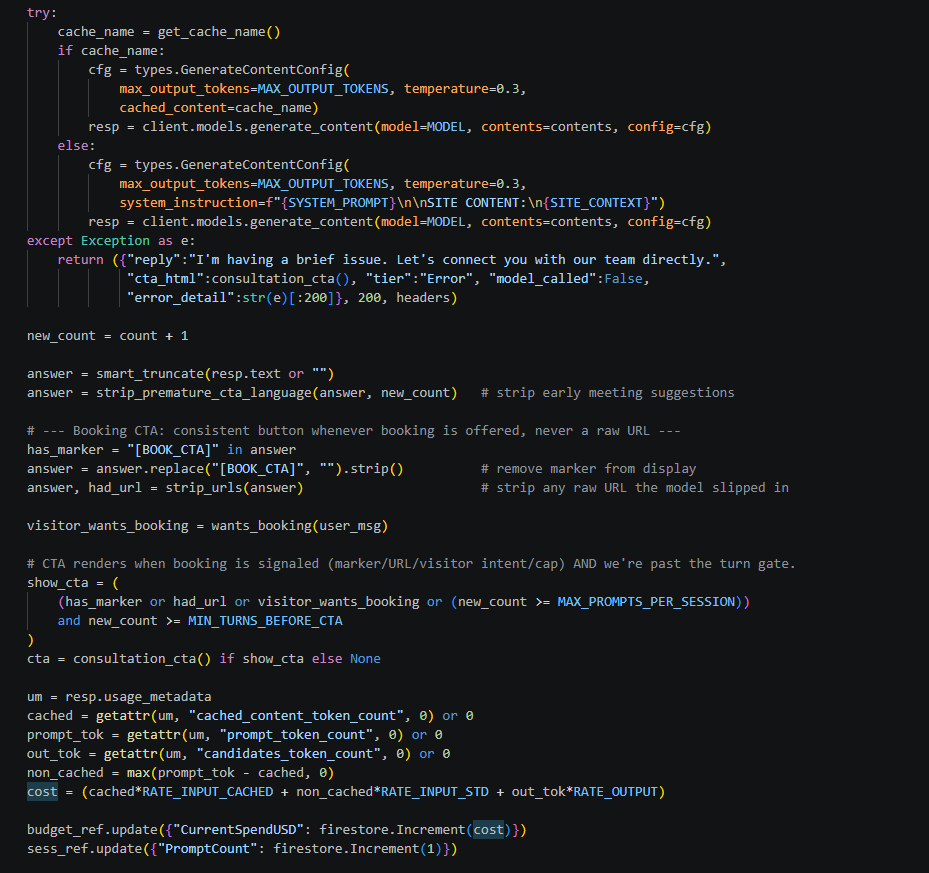
Our agent calculates the exact cost of every single request using the token counts from the model’s response metadata:
RATE_INPUT_CACHED = 0.15 / 1_000_000
RATE_INPUT_STD    = 1.50 / 1_000_000
RATE_OUTPUT       = 7.50 / 1_000_000

um         = resp.usage_metadata
cached     = getattr(um, "cached_content_token_count", 0) or 0
prompt_tok = getattr(um, "prompt_token_count", 0) or 0
out_tok    = getattr(um, "candidates_token_count", 0) or 0
non_cached = max(prompt_tok - cached, 0)
cost       = (cached * RATE_INPUT_CACHED + non_cached * RATE_INPUT_STD + out_tok * RATE_OUTPUT)

budget_ref.update({"CurrentSpendUSD": firestore.Increment(cost)})
Notice the distinction between cached and non-cached input tokens. When the context cache is active, site content tokens are billed at 1/10th the standard rate. When the cache is missing or expired, those same tokens are billed at the full rate. The agent tracks both separately because they represent fundamentally different cost profiles.
The cost is accumulated in Firestore using firestore.Increment() — an atomic operation that prevents race conditions even under concurrent requests.
Monthly Budget Lifecycle
The budget isn’t just tracked, it’s governed through a four-stage lifecycle:
Track → Every request calculates and accumulates its cost.
Monitor → A scheduled job runs every four hours, checking spend against two thresholds:
- 80% (DegradeThreshold): A warning alert fires via webhook — Slack, Teams, PagerDuty, whatever you’ve configured. The alert fires exactly once, not every four hours. Alert deduplication is built in through a boolean flag.
- 100% (MonthlyLimit): A critical alert fires, and the service tier is set to “Degraded.” The agent stops calling the model and serves a fallback CTA instead.
Enforce → The agent reads the current tier on every request. When degraded, visitors see a professional message with a direct booking link — not an error.
Reset → On the 1st of each month, a scheduled job zeros the spend counters and clears the alert flags. Importantly, it preserves any custom budget limits. If someone manually raised the MonthlyLimitUSD mid-month, the reset doesn’t stomp that configuration — it only clears the counters.
Auto-Recovery
One detail we’re particularly proud of: the system self-heals. If the budget monitor finds that spend has dropped below the monthly limit — because someone manually increased the budget, or because a new billing period started — it automatically restores the service tier to “Full” without any human intervention.
Most budget systems require a manual reset to un-degrade. This one doesn’t.
What It Costs in Practice
At current Gemini 2.5 Flash Lite pricing, with context caching:
| Scenario | Monthly Cost |
|---|---|
| 1,000 conversations, 4 turns average, with cache | ~$2.50 |
| 1,000 conversations, 4 turns average, without cache | ~$18.00 |
| Savings from caching | ~85% |
The default budget is set to $10/month — more than enough for a site-level sales agent. The degrade threshold sits at $8, giving you a $2 warning buffer before the agent stops calling the model.
Pillar 2: Behavioral Guardrails
“Prompt = Suggestion. Code = Law.”
This is the thesis of the entire architecture.
Every AI agent has a system prompt that tells the model how to behave. Our system prompt is detailed — it defines a 4-state conversation machine, handles low-energy replies, prevents premature booking suggestions, and forbids URL generation.
But here’s what we learned in production: models don’t always follow prompts.
Not because they’re broken. Because they’re probabilistic. A large language model will follow your instructions most of the time. But “most of the time” isn’t good enough when a model that ignores your “don’t push for a meeting on the first message” instruction ends up feeling like a desperate chatbot instead of a senior advisor.
So we built a second layer of enforcement, in code.
The 5-Layer Output Pipeline
Every model response passes through five processing layers before reaching the visitor:
Layer 1: Smart Truncation
def smart_truncate(text, limit=MAX_ANSWER_CHARS):
    text = (text or "").strip()
    if len(text) <= limit:
        return text
    cut = text[:limit]
    for sep in [". ", "! ", "? "]:
        idx = cut.rfind(sep)
        if idx > limit * 0.6:
            return cut[:idx + 1].strip()
    return cut.rsplit(" ", 1)[0].strip() + "…"
The model is told to keep responses concise. But sometimes it generates a 1,200-character wall of text for a small chat window. This function caps the output at 700 characters, but it doesn’t cut mid-sentence. It finds the last sentence-ending punctuation mark in the safe zone (after 60% of the content has been preserved) and cuts there.
If no sentence boundary is found, it falls back to the last word boundary and adds an ellipsis.
Layer 2: Premature CTA Language Removal
def strip_premature_cta_language(text, turn_count, min_turns=MIN_TURNS_BEFORE_CTA):
    if turn_count >= min_turns:
        return text
    patterns = [
        r"Would you like to (schedule|book|set up).*?\?",
        r"Ready to (schedule|book|set up).*?\?",
        r"Let'?s (schedule|book|set up).*?\.",
        r"Shall we (schedule|book|set up).*?\?",
    ]
    for p in patterns:
        text = re.sub(p, "", text, flags=re.IGNORECASE)
    return text.strip()
The system prompt says: “Don’t suggest a meeting before the visitor has had at least two substantive exchanges.” The model usually complies. When it doesn’t, this function catches phrases like “Would you like to schedule a call?” and silently removes them if we haven’t passed the turn gate (MIN_TURNS_BEFORE_CTA = 3).
Once the turn count is at or above the minimum, this function does nothing — it’s a gate, not a permanent filter.
Layer 3: Booking Marker Extraction
The system prompt tells the model to emit [BOOK_CTA] as a marker when it detects buying intent. The code extracts this marker (retaining it as a signal for whether to render the booking button) and removes it from the display text so the visitor never sees the raw marker.
Layer 4: URL Stripping
def strip_urls(text):
    t = text or ""
    had_url = bool(re.search(r'https?://\S+', t))
    t = re.sub(r'https?://\S+', '', t)
    t = re.sub(r'\s*(here|below|at)\s*:?\s*$', '', t, flags=re.IGNORECASE)
    t = re.sub(r'\s{2,}', ' ', t).strip()
    return t, had_url
The model is explicitly told: “Never write a URL or booking link.” But occasionally, it generates one anyway — usually a hallucinated URL that doesn’t even exist.
This function strips all URLs from the output and also cleans up dangling text like “…click here:” or “…visit the link below:” that would read awkwardly after the URL is removed.
The function returns a boolean indicating whether a URL was found. If the model tried to output a URL, that’s treated as an additional signal for booking intent — the model was probably trying to share a booking link.
Layer 5: CTA Gate Check
show_cta = (
    (has_marker or had_url or visitor_wants_booking or new_count >= MAX_PROMPTS_PER_SESSION)
    and new_count >= MIN_TURNS_BEFORE_CTA
)
The final gate. Even if every other signal says “show the booking button,” it will not render unless new_count >= MIN_TURNS_BEFORE_CTA. This is the hard override.
The prompt says “don’t push meetings early.” The code makes it impossible.
The Conversation State Machine
Beneath the output pipeline, the agent’s behavior is governed by a 4-state conversation machine defined in the system prompt:
| State | Name | Behavior | Transition Rule |
|---|---|---|---|
| 1 | Discovery | Ask one question about their challenge | Enter once, never return. Skip if visitor opens with a specific question |
| 2 | Acknowledge | Validate why their challenge is hard — one sentence | Move to Solution after one clarifier (if needed) |
| 3 | Solution | Match problem to capability. Cite proof points | Primary operating state. Go deeper, not wider. Never repeat. |
| 4 | Intent | Booking CTA | Only on explicit buying signals. [BOOK_CTA] emitted once maximum |
The critical design decision is the low-energy reply handler. When a visitor responds with “ok,” “sure,” “cool,” or “thanks” after receiving a solution, most chatbots interpret that as engagement and push for a meeting.
It’s not engagement. It’s politeness.
The system prompt explicitly tells the model: this is NOT buying intent. Instead of moving to State 4 (booking), the model should offer one additional insight — a related proof point, a different angle, or a qualifying question. If the visitor gives two consecutive low-energy replies, the model offers a graceful exit.
This is the difference between an agent that feels like a senior advisor and one that feels like a used car salesman.
Pillar 3: Graceful Degradation
The agent has a clear hierarchy of degradation, and every level serves the visitor professionally:
| Condition | What the Visitor Sees |
|---|---|
| Everything works | Full agent response with optional booking CTA |
| Cache missing | Full agent response (costs more, but visitor doesn’t notice) |
| Model call fails | “I’m having a brief issue. Let’s connect you with our team directly.” + booking CTA |
| Session prompt cap reached | Lead capture form + booking CTA |
| Monthly budget exhausted | Professional message + direct booking link |
The visitor never sees a stack trace, an error code, or a blank response. Every failure mode routes to a human handoff.
Error Handling Is Not an Afterthought
The error handling in this agent is deliberately designed to communicate cost impact to the engineering team while protecting the visitor experience:
except Exception as e:
    return ({
        "reply": "I'm having a brief issue. Let's connect you with our team directly.",
        "cta_html": consultation_cta(),
        "tier": "Error",
        "model_called": False,
        "error_detail": str(e)[:200],
    }, 200, headers)
The response returns HTTP 200 — not 500. The visitor gets a professional message. The error_detail field is truncated to 200 characters so it’s useful for debugging without ever leaking project IDs, paths, or credentials.
In the cache refresh module, the error log message literally says: “agent falls back to inline (full-price) context.” That one sentence tells the on-call engineer exactly what’s at stake — not just “something failed,” but “something failed and it’s costing you 10x more per request until you fix it.”
Cost Optimization: Context Caching
The agent’s knowledge base is a ~8,000-token document containing service descriptions, proof points, competitive positioning, and objection handling scripts. Without caching, this document is sent with every single request at full input token pricing.
Context caching changes the economics entirely.
How It Works
A scheduled Cloud Function runs daily and creates a Gemini context cache with a 25-hour TTL (providing a 1-hour buffer beyond the daily refresh cycle). The cache includes both the system prompt and the site content. The cache name is stored in Firestore.
At runtime, the agent reads the cache name from Firestore and passes it to the model config. The site content tokens are now billed at the cached rate 1/10th of the standard price.
The Fallback
If the cache is missing (expired, creation failed, first deployment), the agent falls back to inline context. It constructs the system instruction with the site content embedded directly:
cache_name = get_cache_name()
if cache_name:
    cfg = types.GenerateContentConfig(
        max_output_tokens=MAX_OUTPUT_TOKENS,
        temperature=0.3,
        cached_content=cache_name,
    )
else:
    cfg = types.GenerateContentConfig(
        max_output_tokens=MAX_OUTPUT_TOKENS,
        temperature=0.3,
        system_instruction=f"{SYSTEM_PROMPT}\n\nSITE CONTENT:\n{SITE_CONTEXT}",
    )
resp = client.models.generate_content(model=MODEL, contents=contents, config=cfg)
The agent works in both modes. It just costs more without the cache. And because the budget governance tracks cached vs. non-cached tokens separately, the cost difference is visible in the per-request telemetry.
Cache Name in Firestore, Not in Code
The cache name is stored in Firestore, not hardcoded in the agent’s configuration. This enables zero-downtime cache rotation:
- New cache created with updated site content
- Firestore config updated atomically
- Next agent request picks up the new cache
- Old cache expires naturally
No redeployment required.
Security
Bot Protection
Every request includes a Cloudflare Turnstile token. The server verifies it before processing:
def verify_turnstile(token, remoteip=None):
    if not TURNSTILE_SECRET:
        return True  # skip in dev
    try:
        r = _rq.post(
            "https://challenges.cloudflare.com/turnstile/v0/siteverify",
            data={"secret": TURNSTILE_SECRET, "response": token, "remoteip": remoteip},
            timeout=10,
        )
        return bool(r.json().get("success", False))
    except Exception:
        return False  # Fail closed
Note: the function fails closed. If Turnstile verification fails for any reason (network error, timeout, malformed response), the request is rejected. This is a deliberate security decision — we’d rather occasionally block a legitimate visitor than allow bots to drain our budget.
No Conversation Storage on the Server
The server is stateless regarding conversation content. History is managed on the client side and sent with each request. The server stores only metadata — prompt count, budget spend, lead captures. Never conversation text.
This means there’s no server-side PII to protect, breach, or comply with — the client controls its own context.
The Widget
The frontend is a single HTML file. No React. No npm. No build step. No CDN dependency. Paste it before </body> on any page.
This is a deliberate architectural choice. A React-based chat widget would add 40-150KB of framework code to every page load. Our widget is ~3KB. At scale, that’s bandwidth cost you’re paying on every page load for every visitor — not just the ones who open the chat.
Rotating Teasers
Instead of a static “Chat with us” button, the widget shows a random teaser bubble after 4 seconds — once per browser session. Each teaser surfaces a specific proof point or pain point:
🤖 Hi! Most AI agents run without cost controls. Ours don’t. Ask me why.
Clicking the teaser opens the chat AND sends the associated question automatically. The visitor gets value immediately — no “How can I help you today?” preamble.
Deep Linking
Any <a href="#chat"> link on the page opens the widget. This means you can put “Talk to our AI advisor” links in your navigation, inline content, CTAs — anywhere. They all open the same chat panel.
Prompt Duplication: An Architectural Trade-off
The system prompt appears in three files: the core agent, the CLI cache setup script, and the scheduled cache refresh function.
This is intentional, and it’s worth explaining why we chose duplication over abstraction.
Each module deploys independently as a separate Cloud Function. If we extracted the prompt into a shared import, updating the prompt would require redeploying all three functions simultaneously. A version mismatch between the cache (created with prompt version A) and the agent (running prompt version B) would produce inconsistent behavior.
The alternative — storing the prompt in Firestore and loading it at runtime — adds a network dependency to cold start and introduces a new failure mode.
We chose the trade-off we can manage: manual synchronization of three files, with a comment in each one that says "MUST be identical." It’s not elegant. It’s correct.
What’s in the Repo
| Module | Purpose |
|---|---|
sales-agent/main.py | Core conversational agent with 5-layer guardrail pipeline |
sales-agent/cache_setup.py | CLI tool for manual cache creation |
capture-lead/main.py | Lead capture with email validation and CRM webhook |
refresh-cache/main.py | Scheduled context cache refresh |
monitor-budget/main.py | Budget threshold monitor (runs every 4h) |
reset-budget/main.py | Monthly budget reset |
widget/widget.html | Self-contained chat widget |
scripts/ | GCP API enablement and Firestore setup |
site_content_template.txt | Agent knowledge base template with working example |
Every file is annotated with inline comments explaining the architectural decision behind each section — including the failure mode it prevents.
What This Architecture Is Not
This is not a general-purpose agent framework. It’s not LangChain. It’s not trying to be.
It’s a set of patterns for building specific, bounded, production-grade AI agents that operate within defined constraints. The patterns are:
- Budget governance with per-request cost tracking and multi-tier enforcement
- Behavioral guardrails enforced in code, not just in prompts
- Graceful degradation that never shows a visitor an error
- Cost optimization through context caching with automatic fallback
- Security through Turnstile verification, input validation, and output scrubbing
If you’re building a research prototype or a hackathon demo, you don’t need any of this.
If you’re building an agent that will run in production, handle real conversations, and show up on a real invoice — you need all of it.
What’s Next
This is the first agent in the Cognitive Work Architecture repo. The architecture patterns — budget governance, behavioral guardrails, graceful degradation — are designed to be applied to any agent, not just sales.
The inline comments in the code document every decision with the failure mode it prevents. We encourage you to read them, disagree with them, and build on them.
The architecture is the moat. The code is open.
GitHub: Cognitive-work-architecture/sales-agent
This post is part of the Cognitive Work Architecture series — exploring how to build AI agents that operate with the same governance, accountability, and cost discipline you’d expect from any production enterprise system.
Alex Cuciurean is the founder of Sky Alleys, where the Cognitive Work Architecture powers enterprise AI deployments across cloud, manufacturing, and advisory practices.